AI Transcription
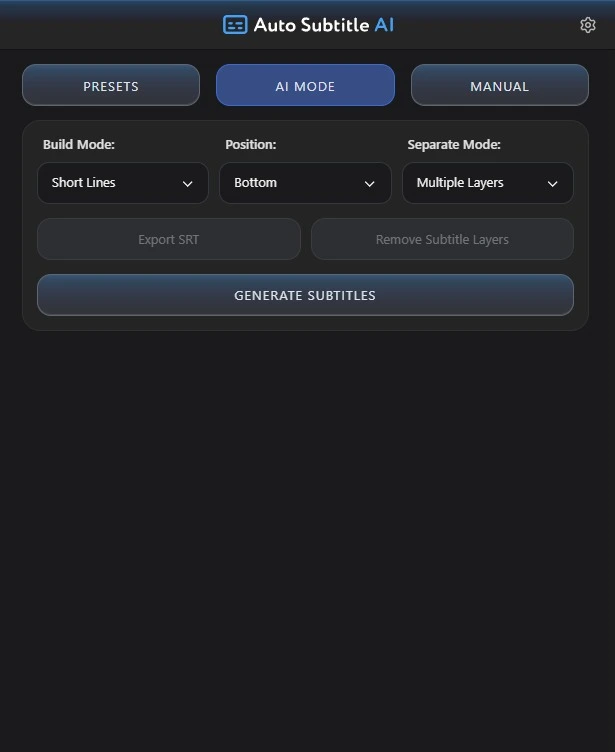
Convert speech from video or audio into accurately timed subtitle layers.
Auto Subtitle AI uses advanced speech recognition to turn video or audio into accurately timed, editable subtitle layers directly inside Adobe After Effects.
 After Effects 2021+99+ LanguagesSRT Support
Convert speech from video or audio into accurately timed subtitle layers.
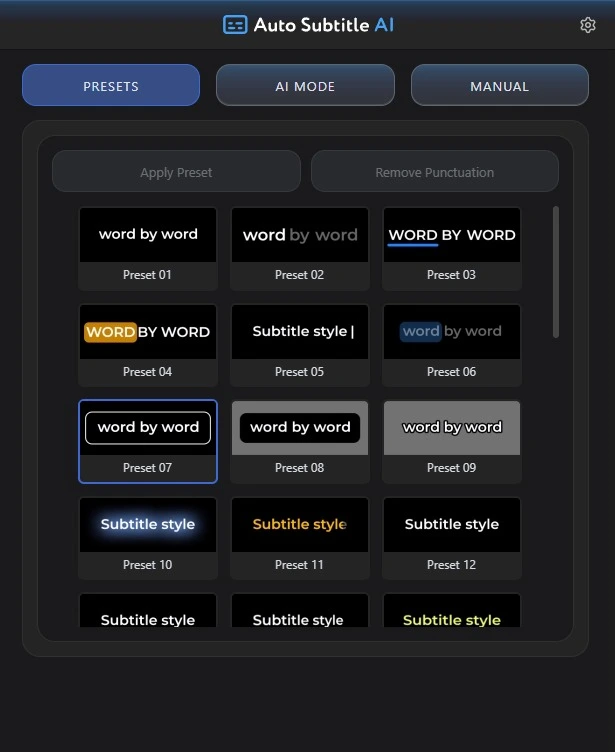
Apply professional animated subtitle styles and customize them directly inside After Effects.
Automatically detect or manually select from more than 99 supported languages.
Import existing subtitle files or export generated subtitles in SRT format.
Watch how to select an audio layer, generate subtitles, apply animated presets, edit the result, and export SRT files.
Transcribe, style, edit, and export without leaving After Effects.
Start with a 7-day free trial. Every plan includes the full Auto Subtitle AI workflow inside After Effects.
For short projects and flexible month-to-month use.
For creators who use subtitles throughout the year.
For long-term use without recurring subscription payments.
Choose a video or audio layer inside After Effects.
Let Auto Subtitle AI transcribe the speech and create timed subtitles.
Apply a preset and customize the text, colors, layout, and timing.
Use subtitles directly in the project or export them as an SRT file.
Generated subtitles remain native, editable layers. Apply animated presets, then refine typography, color, layout, timing, and available animation controls to suit the project.
Find answers about transcription, presets, internet requirements, subscriptions, and supported After Effects versions.
Save time on transcription, timing, styling, and subtitle export.